
Dashboard
Reorganized Dashboard Navigation
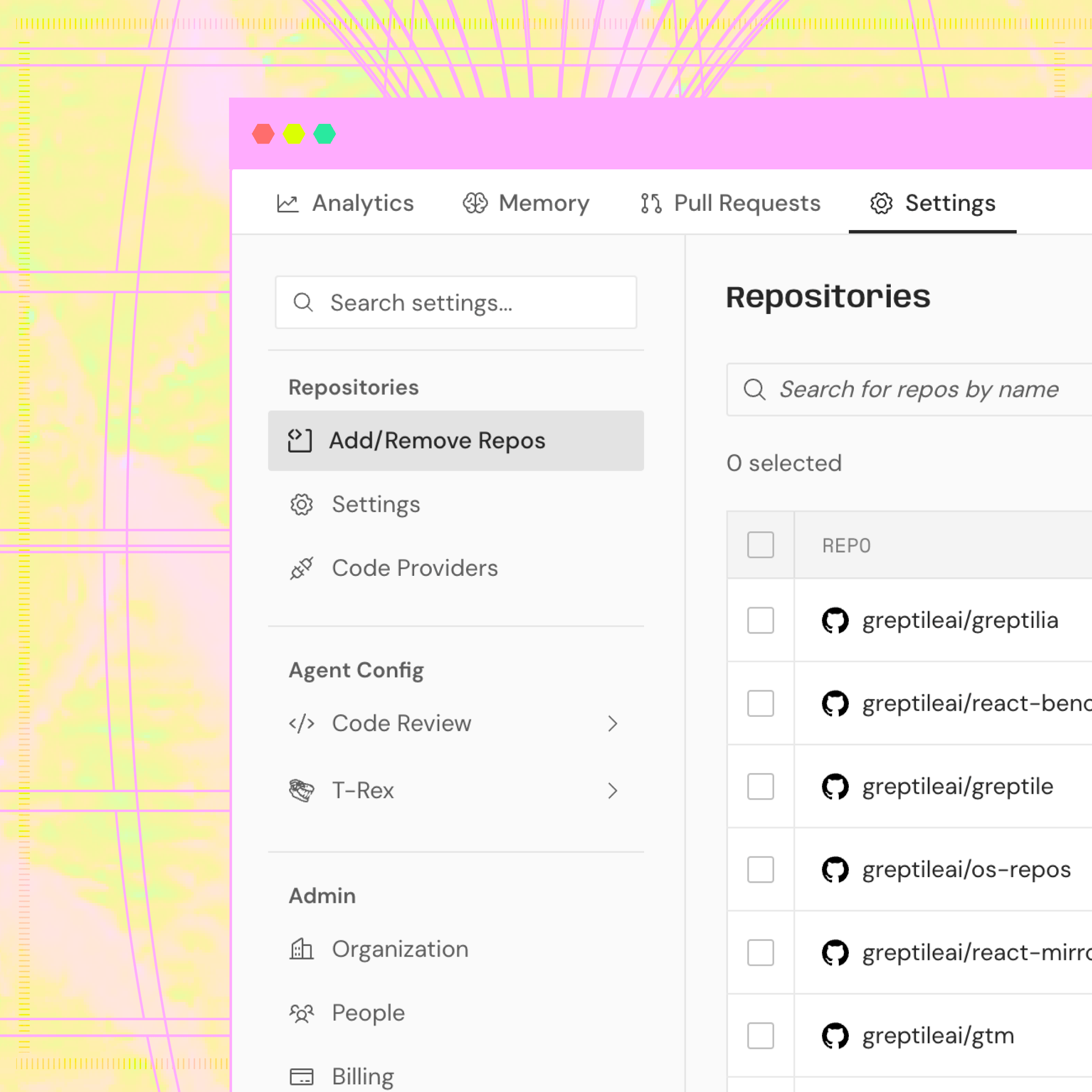
- Unified Settings page — All of your settings now live in one place.
- Simplified top-bar — The top bar is simplified to four tabs: Analytics, Memory, Pull Requests, and Settings — making space for new features.
- Code review settings — now in Settings → Code Review
- T-Rex — now in Settings → T-Rex
- Enable/disable repos — now in Settings → Add/Remove Repos
- Code providers — now in Settings → Code Providers
Billing
Usage Limits
You can now set a dollar cap for additional review spend. Reviews beyond the 50 credits included per active developer in a billing period are billed at $1/credit.When projected spend reaches the cap, Greptile skips new reviews until the next billing period or until you raise the limit.Learn about billing and usage limits →Dashboard
Redesigned Web App
The Greptile dashboard has been rebuilt with a new organization and team hierarchy. Key changes:- Breadcrumb navigation — Switch between organizations and teams from a single dropdown. The sidebar adapts to show organization-level or team-level pages.
- Auto-enable repositories — Toggle in Code Review Settings to automatically enable Greptile on new repos as they’re created in a GitHub org or GitLab group.
- Inheritance & Sync — Team-level settings inherit from the organization. Sync a team back to org defaults with one click.
- Analytics dashboard — Track PRs reviewed, addressed rate, critical bugs caught, merge times, and upvote/downvote ratios. Filter by team, repository, author, and time period. Export data.
- Redesigned onboarding — New users joining an existing organization get a guided setup in Personal Settings: link a GitHub/GitLab profile, install the bridge app, and choose coding agents. Personal review preferences (summary, diagram, collapsible sections) are configured in the same flow.
Config
Multi-Repo Context
You can now give Greptile read-only access to related repositories during reviews. Add acontext.repos field to your .greptile/config.json or greptile.json to reference shared libraries, SDKs, or other repos that help Greptile understand your code.Code Review
Severity Badges
Inline review comments now display a severity badge — P0 (critical), P1 (high), or P2 (medium) — so you can triage feedback at a glance.Learn about severity levels →Code Review
Review Footer Updates
The review summary footer has been updated with new controls:- Review counter — Shows how many times Greptile has reviewed the PR (e.g. “Reviews (2)”)
- Longer commit messages — The “Last reviewed commit” link now shows more of the commit message for easier identification
- Re-trigger button — Click “Re-trigger Greptile” in the footer to re-run a review without tagging @greptileai
Code Review
Greptile v4
Major upgrade to the review engine. v4 delivers significantly more actionable feedback across the board:“Addressed” is determined by an LLM-as-judge evaluating whether the author acted on each comment.
Integrations
Fix in Claude Code, Codex, and Cursor
Every Greptile review comment now includes a Fix in X button. Click it, and the issue gets sent straight to your coding agent — Claude Code, OpenAI Codex, or Cursor — with full context: file paths, line numbers, the review comment, and suggested fixes. Your agent opens, applies the fix, and you review the diff. A Fix All button in the review summary sends every issue at once.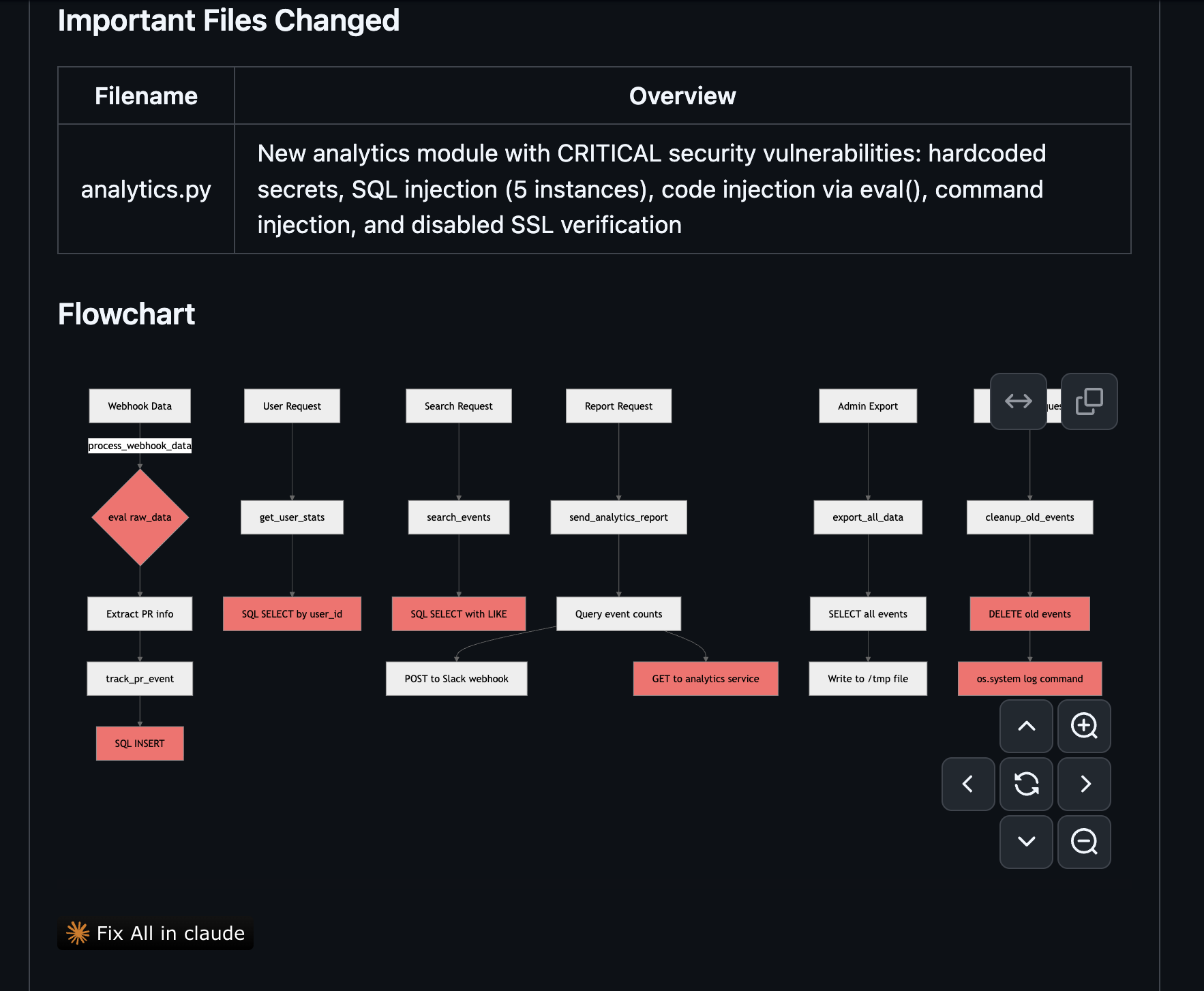
Config
Cascading Config Files
greptile.json files can now be placed in subdirectories to override parent-level review configuration. Settings cascade from root to subdirectory, allowing teams to define org-wide defaults while customizing review behavior for specific folders or modules.Read the configuration reference →Integrations
Greptile Plugin for Claude Code
Address Greptile review comments, manage custom context, and trigger reviews directly from Claude Code. Available in the official Anthropic plugin marketplace.Code Review
Feature Discovery
Code reviews now surface contextual tips highlighting relevant Greptile features based on the content of each review, such as custom rules,greptile.json configuration options, and integration capabilities.Config
Wildcard Repository Scopes
Apply rules across all repositories in an organization or group using wildcards (e.g.,myorg/* or groupa/subgroupb/*). Wildcard options are automatically generated based on your connected repositories.Learn about custom standards →Config
Rule Optimization
Rules can now be generated and refined using AI directly from the custom context dashboard. Try it in the + Add Context dialog at app.greptile.com/review/custom-context.Config
greptile.json v3 Support
greptile.json configuration file now supports v3 code review settings, including custom instructions, skip rules, comment types, and review triggers.See the full configuration reference →Self-Hosting
GitLab Reverse Proxy Support
Greptile can now connect to self-hosted GitLab instances routed through reverse proxies, supporting environments where GitLab is not directly accessible from the public internet. Configure your reverse proxy URL in your integration settings.View deployment options →Code Review
Clarification Questions
Reviews can now append a clarification question to an inline comment when change intent is ambiguous. Follow-up discussion happens in the same thread via implicit thread replies, with no retrigger required.See developer essentials →Code Review
Thread Replies
Greptile now responds to follow-up comments in review threads. Ask a question, request a revision, or push back on a suggestion and Greptile replies in-thread. A classifier decides whether to respond and skips acknowledgments, approvals, or human-to-human discussion.See developer essentials →Config
Configurable Models and Turns
Choose which AI model powers your reviews and set the maximum number of agentic turns per review. Configure both in your review settings to balance speed, depth, and cost.Configure your review settings →Code Review
Code Review v3
Completely rebuilt review engine around an agentic workflow. Reviews now learn your team’s standards from past GitHub and GitLab PR comments, pull context from tools like Jira and Notion, auto-detect project rule files (e.g.,CLAUDE.md, .cursor/rules), and include a copy-prompt action on each comment for quick fixes in your editor.Explore key features →MCP